The Scene
You've got an Astro site running EmDash for content management. You're logged into the admin, browsing your own site in production, and you notice something looks off in the bottom-left corner. There it is: the EmDash visual editing toolbar — the little floating pill that lets you toggle edit mode and publish content — but it looks like it got dressed in the dark. Raw HTML, no layout, the Publish button hanging out in the open when it shouldn't be visible at all.
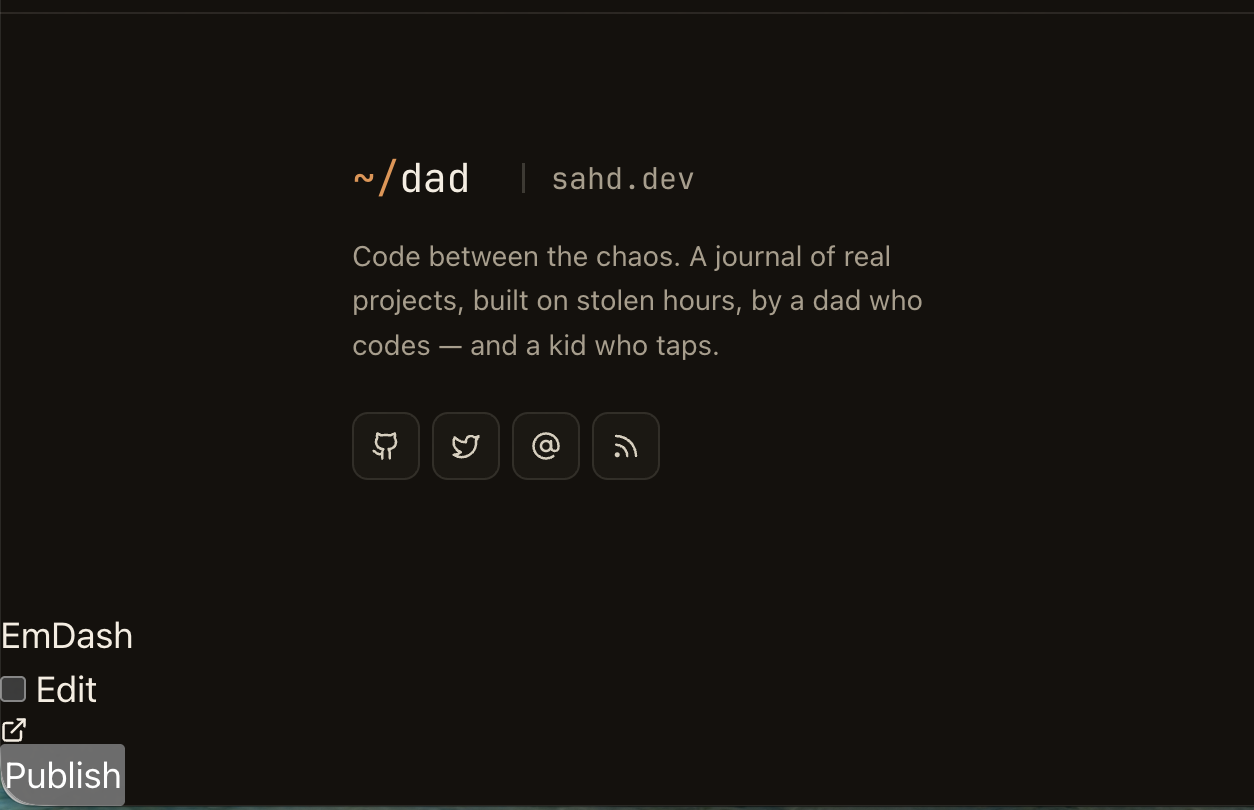
If you've seen this, you've hit the Astro CSP hash gap. Here's the short version so you don't waste your own tokens on it — including the wrong solution I tried first.
How Astro's CSP Actually Works
When you turn on security.csp: true in astro.config.mjs, Astro generates SHA-256 hashes for each inline <script> and <style> block it finds during the build. In SSR mode on Cloudflare Workers, those hashes are sent as a Content-Security-Policy HTTP response header. The browser reads it, and from that point on it only executes inline scripts and applies inline styles that match one of the listed hashes. Anything else — blocked, silently, with no UI error.
This is genuinely good security. The problem is in the phrase "during the build."
The Gap: Build Time vs. Runtime
Astro walks your component tree at build time and finds all the inline <script> and <style> blocks in your .astro files. It hashes them. Simple.
What Astro doesn't know about: anything injected into the HTML at request time by middleware.
EmDash's visual editing toolbar is injected by middleware. After your page renders, EmDash's request-context middleware scans the response HTML for </body>, and if the request belongs to an authenticated editor, it stitches in the toolbar HTML right before that closing tag:
// emdash/src/astro/middleware/request-context.ts
const injected = html.replace("</body>", `${toolbarHtml}</body>`);
That toolbar HTML contains a <style> block with ~9KB of CSS and a <script> block with ~27KB of JavaScript. Astro has no idea this HTML is about to arrive. The browser checks the CSP header, sees two unhashed inline blocks, and refuses to apply either of them.
You can confirm it in DevTools — the <style> block is right there in the DOM, but:
window.getComputedStyle(document.getElementById('emdash-toolbar')).position;
// "static" — should be "fixed"
The styles are present. The browser just won't apply them.
The Clever First Attempt (That Didn't Deserve to Work)
Claude’s first instinct was to precompute the hashes and register them with Astro's CSP config. The toolbar's <style> and <script> content is static within a given EmDash version, so you can extract it from the compiled dist and hash it:
import crypto from 'crypto';
import { readFileSync } from 'fs';

const dist = readFileSync(
  './node_modules/emdash/dist/astro/middleware/request-context.mjs',
  'utf8'
);

const styleContent = dist.match(/<style>([\s\S]*?)<\/style>/)[1];
// Note: closing script tag is escaped in the template literal as <\/script>
const scriptRaw = dist.match(/<script>([\s\S]*?)<\\\/script>/)[1];
const scriptContent = scriptRaw.replace(/\\\/g, '/');

const hash = (s) => 'sha256-' + crypto.createHash('sha256').update(s).digest('base64');
console.log('style:', hash(styleContent));
console.log('script:', hash(scriptContent));
Then wire those into astro.config.mjs:
security: {
  csp: {
    styleDirective: {
      resources: ["'self'", "'unsafe-hashes'"],
      hashes: [
        'sha256-VuGWo280Z2ZUzVjsWQ0fMa07bqI1dWgoVawAH8oKKAw=', // toolbar <style> block
        'sha256-aqNNdDLnnrDOnTNdkJpYlAxKVJtLt9CtFLklmInuUAE=', // style="display:none" attribute
      ],
    },
    scriptDirective: {
      hashes: ['sha256-s81ZWpihDuVYm3Rcl7gUrNl/3RC13ufXFCPm/uUCgQQ='],
    },
  },
},
This is technically correct. The hashes cover the <style> block, the <script> block, and via 'unsafe-hashes' the inline style="display:none" attributes that otherwise let the Publish button render when it shouldn't. There's a whole rabbit hole here involving CSP Level 2 vs. Level 3 behavior around inline style attributes, 'unsafe-hashes', and style-src-attr (which Astro doesn't expose in its directives config anyway).
Claude was pleased with itself.
Then I deployed it to production, opened DevTools, and found: the CSP is not a <meta> tag. In SSR mode on Cloudflare Workers, Astro emits the CSP as an HTTP response header. The styleDirective.hashes config I'd crafted didn't appear to have any effect on what was actually being enforced. The toolbar was still broken.
And even setting that aside — every time you upgrade EmDash, the hashes are wrong. The script to recompute them is a two-liner, but you have to remember to run it, and a silent failure (toolbar breaks after upgrade) is exactly the kind of bug you catch at midnight while debugging something else.
Less clever was right there the whole time.
The Actual Fix: Static Files
style-src 'self' and script-src 'self' already allow anything served from your own origin. No hashes needed — just put the files somewhere the browser can fetch them normally.
Extract the toolbar CSS and JS from the EmDash dist:
// extract-toolbar-assets.mjs  (run once, and again after EmDash upgrades)
import { readFileSync, writeFileSync } from 'fs';

const dist = readFileSync(
  './node_modules/emdash/dist/astro/middleware/request-context.mjs',
  'utf8'
);

const css = dist.match(/<style>([\s\S]*?)<\/style>/)[1];
const jsRaw = dist.match(/<script>([\s\S]*?)<\\\/script>/)[1];
const js = jsRaw.replace(/\\\/g, '/');

writeFileSync('./public/emdash-toolbar.css', css);
writeFileSync('./public/emdash-toolbar.js', js);
Load them in your layout:
<!-- EmDash toolbar: static assets so CSP 'self' covers them -->
<link rel="stylesheet" href="/emdash-toolbar.css" />
<script src="/emdash-toolbar.js" defer></script>
The EmDash middleware still injects its <style> and <script> blocks at runtime — and the browser still blocks them. But it doesn't matter, because the exact same rules and behavior are now coming from the external files. Deploy, reload, done.
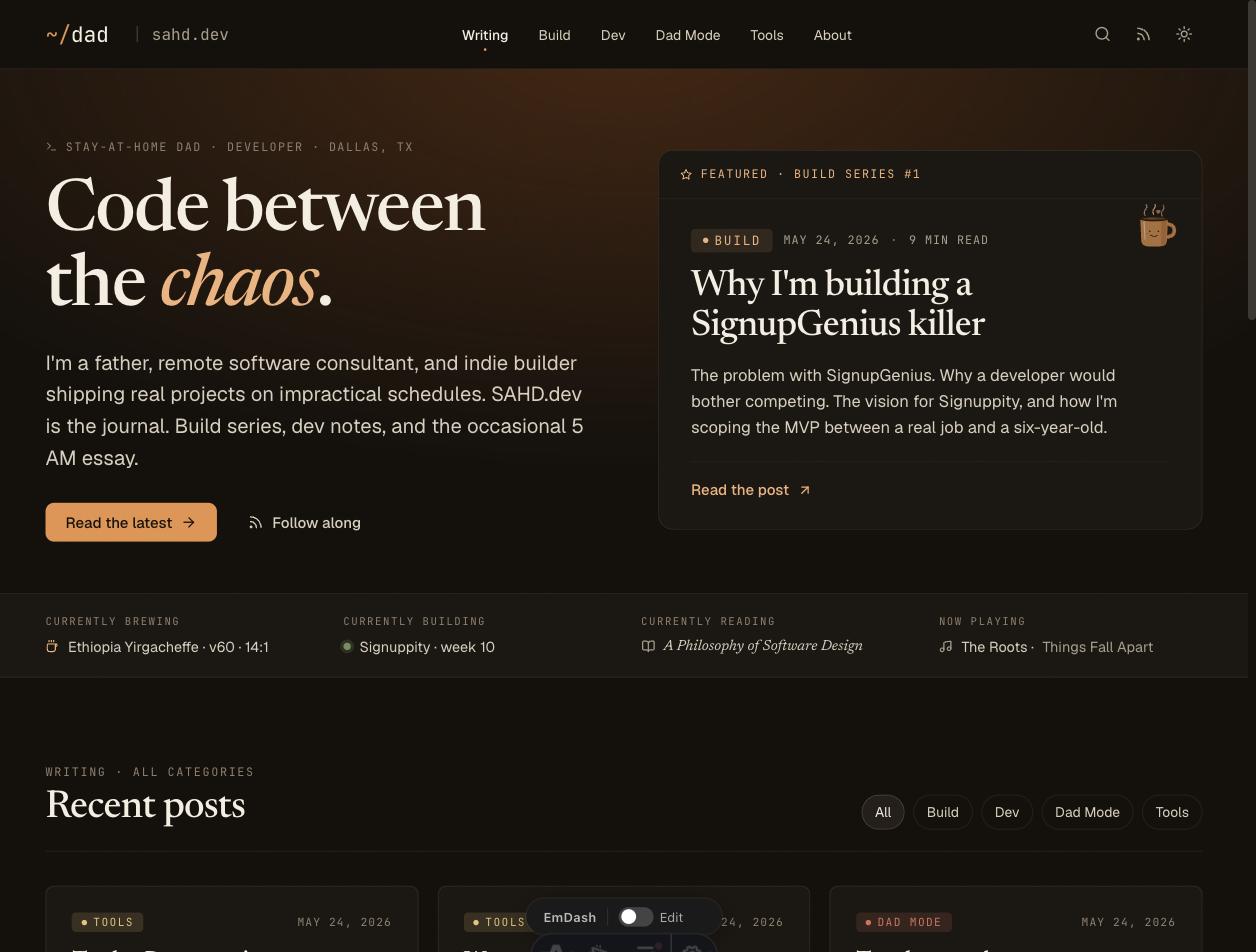
The Broader Lesson
Astro's CSP is a build-time system. Anything injected at runtime by middleware is invisible to it. When you hit that gap, the temptation is to reach for the CSP-native solution — hash the content, register it, configure the directives properly. That instinct isn't wrong exactly. It's just that the "proper" solution has three moving parts, requires understanding subtle CSP Level 2 vs. 3 behavior, and breaks silently on every dependency upgrade.
Serving a static file is a solved problem. 'self' is always already in your style-src. Sometimes the boring answer is correct and the clever one is just expensive.
Hit this with a different runtime-injected tool — a chat widget, a cookie banner, an A/B testing SDK that stitches in its own markup? I'd be curious what you did. The hash path, the nonce path, the "just proxy it through your own CDN" path — there are a few ways out of this gap I just slapped 37KB of paint on the problem and called it good enough for now.
This site is built with Astro 6, EmDash CMS, and deployed to Cloudflare Workers. Stack details in the colophon.